



THE TREATMENT STRATEGIES SERIES in iBOOKS
iBooks is an amazing way to download and read books. iBooks includes the iBooks Store, where you can download the latest best-selling books or your favourite classics — day or night. Browse your library on a beautiful bookshelf, tap a book to open it, flip through pages with a swipe or a tap, and bookmark or add notes to your favourite passages.
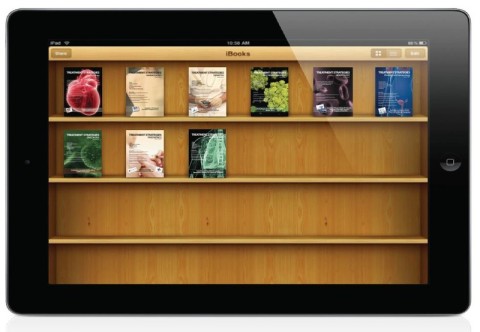
When you use iBooks to open a PDF, iBooks will automatically save a copy of the PDF to your iBooks PDF shelf. These PDFs will also sync back to your iTunes Book library the next time you sync your device with iTunes.
The Latest Editions from the Treatment Strategies Series for your
iBOOKS Collection

Treatment Strategies - Gastrointestinal Endoscopy Volume 1 Issue 1.
Includes ESGE Days 2025 review - highlights, interviews and exhibition hall round-up.
GIVOL1ISSUE1EBOOK.pdf
Adobe Acrobat document [9.9 MB]
Treatment Strategies Gastroenterology Vo[...]
Adobe Acrobat document [21.7 MB]
Treatment Strategies Hepatology Volume 2[...]
Adobe Acrobat document [3.6 MB]
Treatment Strategies Paediatrics Volume [...]
Adobe Acrobat document [5.7 MB]
Treatment Strategies Oncology Volume 5 I[...]
Adobe Acrobat document [21.7 MB]
Treatment Strategies Interventional Card[...]
Adobe Acrobat document [6.9 MB]
Hepatology Volume1 Issue 1.pdf
Adobe Acrobat document [11.1 MB]
BMT Volume 1 Issue 1.pdf
Adobe Acrobat document [16.5 MB]
Treatment Strategies - Gastroenterology [...]
Adobe Acrobat document [16.5 MB]
Treatment Strategies - Paediatrics - Vol[...]
Adobe Acrobat document [16.4 MB]
Treatment Strategies - Diabetes Volume 5[...]
Adobe Acrobat document [14.0 MB]
Treatment Strategies - Oncology Volume 4[...]
Adobe Acrobat document [18.6 MB]
Treatment Strategies - Respiratory Volum[...]
Adobe Acrobat document [19.1 MB]
Treatment Strategies - Cardiology Volume[...]
Adobe Acrobat document [17.1 MB]
Treatment Strategies - Cardiology Volume[...]
Adobe Acrobat document [7.2 MB]
Treatment Strategies - Dermatology Volum[...]
Adobe Acrobat document [10.6 MB]
Treatment Strategies - Diabetes Volume 4[...]
Adobe Acrobat document [17.0 MB]
Treatment Strategies - Gastroenterology [...]
Adobe Acrobat document [13.7 MB]
Treatment Strategies - Hematology Volume[...]
Adobe Acrobat document [14.1 MB]
Treatment Strategies - Interventional Ca[...]
Adobe Acrobat document [17.4 MB]
Treatment Strategies - Obstetrics and Gy[...]
Adobe Acrobat document [11.8 MB]
Treatment Strategies - Oncology Volume 3[...]
Adobe Acrobat document [14.0 MB]
Treatment Strategies - Paediatrics.pdf
Adobe Acrobat document [16.7 MB]
Treatment Strategies - Respiratory Volum[...]
Adobe Acrobat document [14.9 MB]
Syncing and saving PDFs
To add PDFs to your iTunes library on your computer, simply drag and drop the PDF into your iTunes Book library. To sync a PDF to iBooks on your device:
Select your iPhone, iPad, or iPod touch in the Devices list on the left in iTunes 10.1 or later.
Click the Books tab in the resulting window. Ensure that the Sync Books checkbox is enabled.
If iTunes is set to only sync selected books, be sure to enable the checkbox next to the
PDF you want to sync. Click Sync.
iTunes can backup your PDF files so they are restored to your iOS device after a software restore, update, or to transfer information to a different device. When you use iTunes 10.1 or later to sync your PDF files to iBooks 1.2 or later on your iOS device, a backup of your PDF will be automatically created. A copy of the PDF will be added to your iTunes Books library.
Printing PDFs in iBooks
To print your PDFs or notes in iBooks, you must have iBooks 1.2 and iOS 4.2 or later installed.
When viewing your PDF tap on the arrow located in the top menu bar. Tap print.
Select a printer, page range, and number of copies.
Using Sync Collections with PDFs in iBooks
If you have Sync Collections set to ON, iBooks will keep your PDFs (and non–iBooks Store books) in the same collections across all your iOS devices. For example, if you have the same PDF on all your devices, when you move that PDF to your Sci-Fi collection in iBooks on your iPhone, the next time you open iBooks on your iPad, that PDF will appear in your Sci-Fi collection.
If you delete a PDF (or non–iBooks Store book) while you have Sync Collections enabled, it only affects the copy on the device. For example, if you delete the copy of the PDF from your iPad, it will still be present on your iPhone.
 Print
Print